
Open a new image 600 x 150 and flood fill with white Open your Anna Marine tube and copy the lady layer without the wings Paste as new layer Effects, plugins, Mura's Meister - Copies: 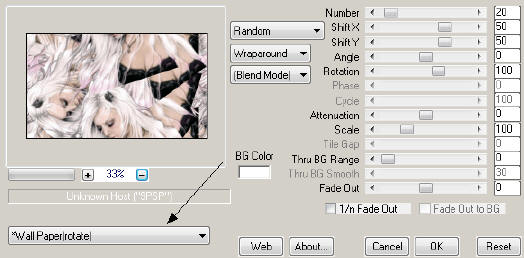 Adjust blur, gaussian blur, 4 Null your foreground, black on the background With your preset shapes tool, pull a rectangle across the tag Convert to raster layer Effects, texture effects, blinds 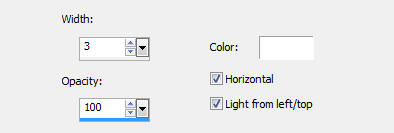 Duplicate this layer On the duplicate layer, image, rotate, free rotate, left 90 Move to the left side of the tag Crop to 600 x 150 On the horizontal blinds layer, reduce the opacity to 40 Paste as new layer (should still be your tube) Move her to the right side Open the candle, copy and close Paste as new layer and resize to suit Move to the left side Duplicate this layer twice so you have three candle layers (Don't put drop shadows on the candle layers) Add your drop shadows to the woman and the lines layers I used 3, 3, 20, 5, black Click your top layer to activate it New raster layer, flood fill with #428400 Select all Selections, modify, contract, 5 Edit, cut Deselect Add your copyright info and license number for the Anna Marine tube For my text, I used the same green, font is Weekend in Paris For my name, I used the same green, font is Kuntsler Script Give both a small drop shadow Click your top candle layer to activate it With your freehand selection tool, outline the flame on the candle Effects, plugins, Eye Candy 5, Nature - Fire On the settings tab, use Small Candle 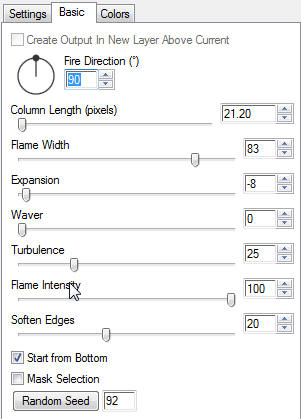 Click the middle candle layer to activate it Repeat the fire plugin, but change the random seed Click the bottom candle layer to activate it Repeat the fire plugin, but change the random seed Deselect Close the eye on the middle and bottom candle layers Click the top candle layer to activate it Edit, copy special, copy merged Go to AS and right click to paste as new animation Back to PSP, close the eye on the top candle layer Open the eye on the middle candle layer and click it to activate it Edit, copy special, copy merged Go to AS and paste after current frame Back to PSP, close the eye on the middle candle layer Open the eye on the bottom candle layer and click it to activate it Edit, copy special, copy merged Go to AS and paste after current frame Save as a GIF file and you're done!  For the avatar, I just cropped the left side of the tag at 150 x 150 (on the psp layers) I added the frame the same way as the tag, and animated the same way also tagcatz
|